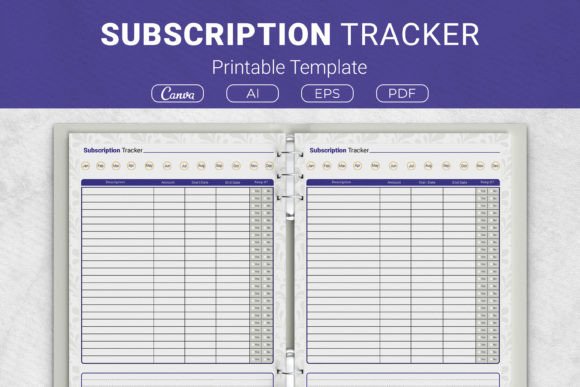
Take Control of Recurring Costs with a Subscription Tracker Template
It starts innocently enough. A free trial here, a discounted streaming service there, a cloud storage upgrade you forgot to cancel after a project ended. Before long, your bank statement reads like a maze of small, recurring charges that quietly drain your budget. If you’ve ever wondered where your money disappears each month, a Subscription Tracker Template can turn that confusion into clarity—and put real savings back in your pocket.
This isn’t about complicated budgeting software or restrictive rules. It’s about having one reliable place where all your subscriptions live, from streaming and software to meal kits and membership boxes. Whether you prefer a tangible paper sheet or a customizable digital file, a well-designed subscription tracker printable template makes financial oversight feel effortless.
The Hidden Weight of Subscription Overload
Modern life runs on subscriptions. Music, movies, fitness apps, productivity tools, even razor blades—they all expect you to pay monthly. The problem isn’t any single cost; it’s the accumulation. A $4.99 app here, a $14.99 premium membership there, and suddenly you’re spending more than a utility bill on things you barely use.
Many adults face the same frustration: they know they have too many subscriptions but lack a clear picture of what they’re really paying. Guessing rarely works, and manual bank statement scrolling is tedious. The real challenge isn’t motivation—it’s organization. When everything lives in your head or spread across dozens of confirmation emails, oversights are inevitable. A dedicated tracker solves this by giving you a structured, at-a-glance summary.
How a Subscription Tracker Printable Template Brings Immediate Clarity
Imagine a single sheet of paper or a clean digital page that lists every recurring payment, its cost, the billing cycle, and a simple question: Should I keep this? That’s exactly what a Subscription Tracker Template provides. By writing down each service, you transform an abstract expense into a concrete decision point.
Record descriptions, amounts, start and end dates, and whether you want to continue or cancel. A well-made template often includes a dedicated area to tally your total monthly or annual spend. This number alone can be eye-opening—many users discover they’re wasting hundreds of dollars annually on services they forgot about. The beauty of a printable version is its physical presence. Tuck it into a household binder, attach it to your fridge, or slip it into your planner. The simple act of noting a subscription reinforces awareness in a way that a hidden app notification never will.
Who Benefits Most from a Subscription Tracker?
While anyone with recurring payments stands to gain, different groups use the same tool in distinct ways. A busy parent juggling family streaming services and educational apps might print a fresh subscription tracker printable template each quarter and hang it in the home office. A freelancer tracking software seats for client projects can quickly see which tools to cancel after a contract ends, preserving cash flow.
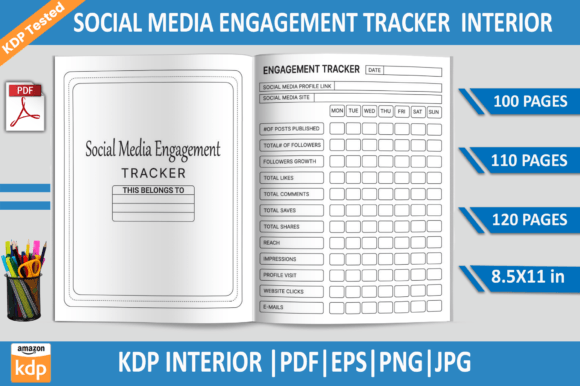
Small business owners often need to monitor cloud storage, email marketing platforms, and industry subscriptions. A physical tracker inside a binder becomes part of the weekly admin routine. On the creative side, Kindle Direct Publishing authors and self-publishers find immense value in the editable source files—AI, EPS, and Canva formats allow them to customize the tracker as a polished KDP interior for low-content books. They can design an entire “Subscription & Bill Organizer” and reach an audience already searching for financial planners. Meanwhile, personal users appreciate multiple size options: US Letter or A4 for full-size binders, and 7.5 x 9.25 inches or 6 x 9 inches to fit smaller discbound planners or travel pouches.
Key Details Every Effective Tracker Should Capture
Not all trackers are built equal. A useful Subscription Tracker Template goes beyond a simple list of names and asks the right questions. The best designs prompt you to record:
- Subscription name and description – Because “Entertainment” could mean five different things.
- Monthly or annual cost – Seeing true annual amounts often motivates change.
- Billing cycle and renewal date – Prevents surprise charges on a busy day.
- Start date and end date – Essential for free trials with auto-renewal traps.
- Status – Keep, cancel, downgrade, or renegotiate.
- Payment method – Which card or account gets charged, helpful for fraud checks.
A dedicated totals box at the bottom makes the overall spending figure impossible to ignore. When you see that you’re spending $189 per month on digital subscriptions alone, you’re far more likely to trim the fat.
From Print to Practice: Setting Up a Working System
Implementation doesn’t require special skills. First, pick your preferred format. If you’re a paper person, print the PDF on US Letter or A4 and three-hole punch it for a binder. The 7.5 x 9.25-inch and 6 x 9-inch sizes slip easily into popular discbound planners like the Happy Planner or a personal notebook. Some users laminate the sheet and use a wet-erase marker to update it weekly—no reprinting needed.
For those who prefer digital, the included Canva template opens immediately in your browser. You can type directly into the fields, change colors to match your aesthetic, and save a master copy to edit each month. The AI and EPS files give designers total freedom to modify layouts or add branding. This is especially powerful for KDP publishers who want to offer unique interiors that stand out in the marketplace.
Turning Awareness into Long-Term Savings
A tracker is only as valuable as the actions it inspires. Start by filling in everything, no matter how small. Then ask yourself three questions for each entry: Do I use it weekly? Could I share it with family? Is the value worth the cost? One user realized her family had three music streaming platforms. By consolidating to a single family plan and canceling the other two, she saved over $30 a month. Another freelancer used the tracker to identify a project-management tool he hadn’t opened in six months—cancelling it freed up $240 a year.
Make the tracker a living document. Set a recurring calendar reminder to review it on the same day you pay bills. As you cancel services, check them off and watch the total drop. This visible progress reinforces the habit. Over time, you’ll naturally become more skeptical before starting new trials, knowing you’ll have to log it.
Adapting the Template to Your Unique Lifestyle
There’s no single right way to track. A minimalist might keep only the essentials—rent, utilities, and a couple of chosen subscriptions—on a compact 6 x 9-inch sheet tucked into a pocket planner. A financial coach might use the US Letter version as a client handout, pairing it with a budget binder. Small-business owners can create multiple sheets: one for operational software, one for marketing tools, and one for personal services.
The availability of editable files makes customization simple. Change section headings, add a column for “shared with,” or incorporate a due date column. If you’re selling a planner on KDP, the AI and EPS formats let you build a versatile interior that appeals to customers looking for a practical subscription tracker printable template. Because the source files are open and fully editable, you can scale the design to any trim size you need.
Bridging Digital and Physical Worlds
Some people swear by spreadsheets; others need the tactile reinforcement of pen on paper. The good news is you don’t have to choose exclusively. A hybrid approach often works best. Keep the Canva file as your digital master that syncs across devices for quick mobile checks. Print a physical copy every month or quarter to engage with intentionally—physically crossing out a cancelled subscription is surprisingly satisfying.
This dual method also provides a backup. If your binder gets misplaced, your digital record remains intact. If your laptop crashes, you still have the most recent printed sheet. It’s a low-tech safety net that upholds the central goal: never losing track of where your money goes.
Integrating Into a Larger Financial Routine
A Subscription Tracker Template plays best with others. Place it alongside a monthly bill checklist, a savings log, and a spending tracker in a home finance binder. When you review your bank statement, the subscription list helps you verify charges against expected amounts. Any discrepancies immediately stand out.
If you’re a KDP creator, consider bundling the subscription tracker with other useful logs—like an annual expense planner or a debt payoff journal—to create a comprehensive financial organizer that solves multiple problems for your buyers. For personal users, using the same binder for your budget and your subscription log means you never have to hunt for information when you’re thinking about cutting costs.
By keeping every recurring expense visible, you transform a passive, money-draining habit into an active, conscious choice. You’ll not only identify areas to save but also gain peace of mind knowing your financial house is in order. Whether you choose a crisply printed sheet, a customized Canva design, or a polished KDP interior, the path to a lighter, more intentional subscription load starts with a single, well-organized page.