Running Log Book KDP Interior Vol.1: A Ready-to-Publish Template for Self-Publishers
Building a profitable print-on-demand business on Amazon KDP often comes down to two things: a marketable idea and clean, professional interiors that pass Amazon’s strict print checks. The Running Log Book KDP Interior Vol.1 addresses the second half of that equation directly. Instead of designing a journal from scratch—measuring margins, testing bleed, adjusting pagination, and second-guessing file export settings—publishers can take this pre-built interior package and move straight to branding and listing optimization.
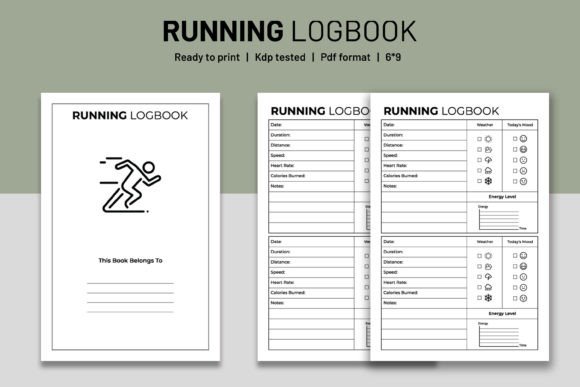
This digital asset contains every core element a running log needs: a dedicated intro page, 120 total pages formatted for 8.5 × 11 inches, and full bleed readiness that eliminates the guesswork around trim and margin errors. Because the interior has already been KDP tested, the upload process reduces to selecting the file and confirming the preview. For anyone managing multiple KDP titles or building a series of niche journals, that consistency alone shortens production timelines significantly.
What Makes Running Log Book KDP Interior Vol.1 Different from a Basic Template
Many free or low-cost interiors arrive as a single PDF with minimal flexibility. The Vol.1 bundle instead provides three file formats: an editable AI (Adobe Illustrator) file, high-resolution PDF files, and high-resolution PNG files. The inclusion of editable source files matters if you plan to customize headings, add motivational quotes, insert a logo, or tweak the footer design. With the AI file, you can keep the overall structure while layering in your own brand elements without rebuilding the page grid.
The PNG files serve a different purpose. They let you extract individual page designs for promotional mockups, social media previews, or A+ Content images. If you decide to create a paperback and hardcover version of the same running log, the layered flexibility means you don’t have to re-export everything from a single locked file. You pull what you need, adjust for the new trim size, and keep moving.
Where This Interior Fits in a Self-Publishing Workflow
Most publishers follow a sequence: niche research, keyword and category selection, interior design, cover design, listing creation, then launch. This interior lands exactly at the interior design stage but influences the steps around it. Once you know you’re targeting runners—marathon trainers, casual joggers, trail runners—you can map the log’s structure to the specific data points those users track. The Vol.1 interior typically includes dated entry fields, distance, time, pace, notes, and possibly a weekly or monthly summary. Instead of asking what to include, you evaluate how the existing layout matches your audience’s habits, then decide whether to edit or go live as-is.
If your audience tracks heart rate, shoe mileage, or cross-training sessions, open the AI file and add those rows. If the layout already aligns with what buyers expect from a general running journal, upload the print-ready PDF and move on to cover design and keyword research. The point is that the interior removes design friction, letting you allocate time to higher-impact tasks like competitive research or optimizing the back-cover description.
Preparing the Files for a Smooth Amazon KDP Upload
Even with a KDP-tested interior, preparation matters. Always open the PDF in a proper viewer—Adobe Acrobat, not a browser tab—and confirm that fonts embedded correctly, all pages render, and the bleed extends fully to the trim edge. The Vol.1 package includes bleed, meaning images or color blocks that touch the page edge won’t leave a white sliver when trimmed. On KDP, you select “Bleed” during title setup so the print preview accounts for that extra margin.
Check the intro page: it introduces the log to the user. Some publishers replace the default intro text with their own tone, so the AI file becomes essential. Others leave it as a functional starting page. Either way, KDP’s previewer will flag if the page count doesn’t match the listing. Since Vol.1 comes with exactly 120 pages, you must enter that number accurately. If you add pages through editing, update the count. Mismatched page numbers are one of the most common rejection triggers on KDP.
File Formats and When to Use Each
- Editable AI File: Use when you need to modify layouts, add branding, swap fonts, or adjust data fields. Requires Adobe Illustrator or compatible vector software.
- High-Resolution PDF Files: The direct upload file for KDP. No editing required if the layout fits your concept. Already flattened and ready for print.
- High-Resolution PNG Files: Individual page exports for marketing assets, A+ Content, thumbnail previews, or creating spiral-bound versions via other POD platforms.
If you plan to release multiple versions—a minimalist edition, a floral cover edition, a gear-focused edition—keep the AI master file. Make a copy for each variant, tweak, export PDF, and upload. The underlying grid stays consistent, but the periphery elements shift to fit the theme.
Integrating the Running Log into a Broader Product Line
A single running log works, but many publishers build authority by clustering related journals. Consider how Running Log Book KDP Interior Vol.1 interacts with other interiors in your catalog. A fitness planner, a meal prep tracker, or a strength training log all share a similar buyer. Repetition in layout style across those products makes your brand recognizable in search results and increases the likelihood of multi-purchase behavior.
Use the AI file to standardize elements like header placement, fonts, and instructional text. Then when a buyer moves from your Running Log to your Hiking Log or Cycling Journal, the experience feels cohesive. That familiarity reduces returns, increases positive reviews, and gives you a systematic approach to releasing new low-content books quickly. Instead of sourcing or designing each interior from zero, you adapt the master template each time, cutting production from days to hours.
Practical Tips for Keeping Quality High Across Multiple Uploads
Amazon’s print quality relies on more than just bleed and trim size. Page color and ink density matter. If your interior uses heavy headers or images, ensure no single page approaches the maximum ink coverage limit. The Vol.1 files are typically light on ink—logs are mostly line art and tables—so the risk is low. However, if you add dark backgrounds or full-bleed color, test a proof copy before ordering large author copies.
For long-term use, store the original AI and PNG files in a dedicated folder with a clear naming convention: RunningLog_Vol1_MASTER.ai, RunningLog_Vol1_PRINT.pdf. When KDP updates its print specs (as it sometimes does), you’ll need to re-export with adjusted settings. Having organized source files means you can respond to changes in an afternoon rather than losing a listing for days.
How to Edit and Customize Without Breaking the Layout
Editing a pre-designed interior requires restraint. The temptation is to overcomplicate—add decorative icons, extra pages, fillable fields—but a running log’s value is in its clarity and ease of use. Focus edits on what improves the user experience: increasing row height for hand-written entries, adding a gear checklist page, or including a race day reflection section.
- Open the AI file and immediately save a copy as a working version. Never edit the original directly.
- Work in layers. If the file is well structured, text, graphics, and guides sit on separate layers. Edit only the relevant layer.
- Keep page count divisible by 4 or 8. While KDP allows various page counts, maintaining a clean signature count reduces printing inconsistencies. 120 pages already meets this standard.
- Test print at home on 8.5 × 11 paper before ordering an author copy. Even with bleed, seeing the physical page helps you notice alignment issues that screen previews hide.
If you don’t have Adobe Illustrator, you can still modify the PDF in some vector-capable tools like Affinity Designer or Inkscape, but always double-check that fonts convert to outlines and bleed remains intact. The PNG files are raster, so they’re not suitable for text edits, only for marketing and mockup use.
User Scenarios: Who Benefits Most from a Ready-Made Running Log Interior
The typical buyer for a running log is an intermediate to advanced runner who wants to track progress over weeks or months. But the publisher side covers a wide range. A freelance graphic designer might use the interior as a starting point for a client’s branded fitness journal, customizing the colors to match the client’s logo. An entrepreneur testing multiple KDP niches can launch a running log without hiring a layout designer, validate demand, and then invest in custom interiors if the niche proves profitable.
Educators and coaches also find value. A high school track coach could edit the log to include team goals and workout prescriptions, then publish a school-specific version for fundraising. Because the AI file is fully editable, the interior conforms to specific coaching language without rebuilding the table structure. The same file can become a hydration log, a sleep tracker, or a nutrition log with only minor label changes. The skeleton remains, but the content adapts.
Long-Term Considerations: Keeping Your KDP Catalog Alive
Low-content books face a lot of competition, so longevity depends on reviews, category ranking, and listing updates. Having a polished interior like Vol.1 helps initial quality, but you also need to update listings periodically—add new keywords, refresh the description, upload revised interiors if data fields evolve. When the editable source file is easily accessible, making a small update takes minutes. Without it, you might have to abandon a book that still sells well because you can’t adapt to a new trend or fix a formatting error.
Consider creating a version log in your project folder. Note what you changed in the AI file and when, then update the PDF version number. If KDP introduces a new paper type or color option, you can test your interior against that spec without confusion. This level of organization transforms a single interior purchase into a reusable production asset that underpins multiple titles over years.
With 120 pages, 8.5 × 11 format, and full bleed, the Running Log Book KDP Interior Vol.1 acts as a drop-in solution for publishers who value speed and consistency. It’s not just a file download; it’s a launch-ready foundation that lets you spend more time understanding runners’ needs and less time fighting layout software. Whether you’re building your first journal or your fiftieth, working from a tested, editable interior helps you publish with confidence and keep your creative energy focused on growth rather than technical formatting.