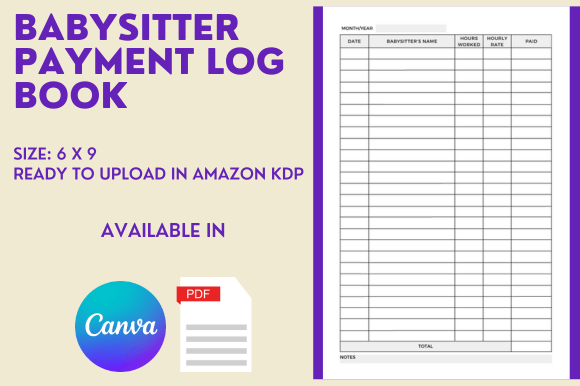
Streamlining Childcare Payments with a Customizable Babysitter Payment Log Book
Tracking hours and payments between parents and babysitters often starts with hurried notes on scrap paper or a chaotic string of text messages. These makeshift methods can quickly lead to confusion, disputes, and lost information. A dedicated recording system transforms this everyday necessity into a clear, professional process. Within the self-publishing space, the Babysitter Payment Log Book - KDP interior offers exactly that foundation—not just for the families who will ultimately use the book, but for the creators looking to build a low-content publishing business around practical, high-demand tools.
Whether you are an established Kindle Direct Publishing seller or someone exploring a side income stream, understanding what makes a log book interior valuable can shape your decisions. This article explores the purpose, features, and real-world application of a babysitter payment log book template designed for KDP, along with the strategic advantages it brings to your publishing catalogue.
Why a Payment Log Matters in Modern Childcare
Picture a typical week in a household that relies on a sitter. One day might involve picking up kids from school, another evening requires a late-night gig, and the weekend brings a full-day soccer tournament. The hours stack up differently, sometimes with extra duties like meal prep or homework help. Without a structured record, parents and sitters end up relying on memory—and memory is rarely accurate when it comes to detailed numbers.
A payment log book solves this by providing a single place to record date, start and end times, hourly rate, total due, and signatures. It introduces clarity and accountability. For parents, it becomes a household management tool that tracks weekly childcare expenses and helps with budgeting. For babysitters, especially teenagers and young adults just learning financial responsibility, it serves as a professional record of income earned. The physical format—pen to paper—often feels more intentional than a phone app, reducing the chance of data loss and creating a tangible document both parties can reference.
This real-world utility is exactly why a well-designed Babysitter Payment Log Book - KDP interior holds consistent demand on platforms like Amazon. It meets a genuine, recurring need. For low-content publishers, that translates into a product with evergreen potential, not a fleeting trend.
Understanding the KDP Interior as a Publishing Asset
Low-content books—journals, planners, log books, sketchbooks—require clean, functional interiors that customers can use immediately. The challenge for creators is that building a layout from scratch demands time, design skills, and an understanding of print specifications. That’s where a pre-made interior like the Babysitter Payment Log Book - KDP becomes a practical asset. Instead of staring at a blank canvas, you receive a ready-to-upload PDF with 110 pages, perfectly formatted to 6 x 9 inches with bleed settings already applied.
Bleed is a detail that often trips up newcomers. When interior pages have elements that extend to the edge of the paper, a bleed setting prevents white slivers after trimming. This interior handles that requirement, so you avoid common rejection reasons during the Amazon KDP review process. The page count also hits a sweet spot: enough pages to give the book substance and perceived value, but not so many that printing costs eat into your royalty margins.
Perhaps the most valuable component is the editable Canva template link. Canva has become a go-to design platform for its drag-and-drop simplicity and vast asset library. With this template, you can change fonts, adjust colors, add branding, insert a custom page at the front, or tweak any table layout element. You maintain full creative control while skipping dozens of hours of initial design work.
Who Benefits from a Ready-Made Babysitter Log Interior
The obvious audience includes KDP sellers who want to expand their low-content product line without increasing production time. If you already publish journals or planners, a babysitter payment log adds variety and helps you attract a family-oriented customer segment. Because the subject is specific, the competition in search results may be narrower than in broader categories like “blank notebooks,” which improves discoverability.
Beyond publishers, freelancers who offer book formatting services can use this interior as a base template to deliver faster turnarounds to their clients. Virtual assistants managing multiple author brands also find value in a ready-to-edit template that can be reskinned quickly for different niches. Even brick-and-mortar businesses—a daycare center, a nanny placement agency, or a parenting resource shop—might customize the interior to create branded log books for their clients, using Canva’s print-on-demand integrations to order physical copies.
And of course, the end users—parents, guardians, and babysitters—gain a product that brings order to an often chaotic arrangement. A well-designed log book reduces the mental load of tracking payments and makes the working relationship feel more professional on both sides.
Customization Features That Let You Stand Out
When you launch a low-content book on Amazon, your cover catches the eye, but the interior determines whether customers leave positive reviews and return for future editions. The Babysitter Payment Log Book - KDP Canva template gives you the flexibility to make the interior align with your brand voice or your target customer’s style.
You might, for instance, create a playful version with pastel colors and whimsical icons for a teen babysitter audience. Alternatively, you could produce a minimalist, black-and-white design that appeals to busy professional parents who value clean function over decoration. Changing the table headers, adding a notes section, or inserting a monthly summary page are all straightforward edits within Canva. Because the template is already built with consistent margins, proper alignment, and a logical flow, you don’t have to worry about technical formatting errors while you focus on creative differentiation.
It’s important to note that while the template gives you strong bones, the final marketability depends on your additional touches. Adding a subtle prompt, like “Special instructions for today’s care” or a small area for the child’s mood or meal tracker, could elevate the book from a simple payment log to a comprehensive childcare tool. Such thoughtful additions, enabled by the editable design, can become key differentiators in a niche where competitors might overlook these details.
Practical Considerations Before You Publish
Every KDP interior comes with its own set of considerations. This one’s 6 x 9 inch trim size is a standard that works well for paperback books, ensuring a comfortable fit on shelves and in bags. However, if your brand typically uses a larger format like 8.5 x 11 inches to convey a workbook feel, you’ll need to factor that against the time saved by using a template that’s already correctly sized. Resizing is possible but adds extra steps.
The bleed setting, while helpful for designs that bleed, may not be necessary if you plan a strictly clean inner margin. In KDP, uploading a file with bleed when your content doesn’t require it can sometimes cause slight shifts in positioning during the manufacturing process. This interior is configured with bleed, so if you remove all edge-to-edge graphical elements and want a pure interior, you might adjust the export settings in Canva to turn off bleed. Understanding such nuances ensures the printed book looks exactly as you intend.
Additionally, while 110 pages is a solid length for a payment log (providing around 100-105 entry spreads when you account for a title page and any added instruction sheets), consider your target customer’s usage pattern. A sitter who works a few times a week may fill the book in under a year; someone with multiple families might go through it faster. You could add value by inserting a “Log Book Completion Checklist” or a date range tracker so users can quickly see the book’s covered period. These minor structural tweaks, all possible within Canva, improve user experience and can boost review sentiment.
Scenarios Where This Interior Becomes a Time-Saver
Imagine you’re a KDP publisher who typically creates interiors in Adobe InDesign from scratch. For a typical 100-page log book, building the grid, aligning tables, setting paragraph styles, and ensuring the document meets KDP’s print requirements can take an entire afternoon. Multiply that by multiple niches, and time becomes your scarcest resource. The Babysitter Payment Log Book - KDP template eliminates that repetitive technical work. You open the Canva link, apply your chosen color palette, insert your own introductory text, and export—often within the same hour.
Another scenario involves testing a new niche with minimal risk. If you’re unsure whether a babysitter-themed log will perform in your store, purchasing a pre-tested interior lets you run a low-cost experiment. If the book sells, you can reinvest the royalties into expanding the line. If it doesn’t meet expectations, you haven’t poured days of manual design labor into a product that underperformed. The 110-page PDF file is also ready to upload as-is, meaning you can go from purchase to published listing in minutes, perfect for Amazon’s fast-moving marketplace where seasonality—like summer vacation childcare demand—can impact sales.
Enhancing Royalty Potential with a Focused Niche
The low-content book space is crowded with general-purpose journals. A log book tailored to a specific, recurring activity helps you angle for long-tail keywords with higher buyer intent. A parent searching for “babysitter payment tracker book” is closer to a purchasing decision than someone browsing “blank notebook.” This interior allows you to build exactly that targeted product.
Moreover, because childcare costs are a significant household expense, a tool that supports transparent tracking has a built-in justification for purchase. The log book can be positioned not just as a notebook, but as a financial organization tool. Cleverly crafted product descriptions and A+ content that speak to tax preparation (for parents who use a childcare FSA), or helping teens learn bookkeeping basics, can justify a higher price point compared to a non-specific notebook. The Babysitter Payment Log Book - KDP interior’s clean, repeatable table structure supports these marketing angles because it looks inherently official and organized.
Is This Interior Right for Your Publishing Goals?
Deciding whether to integrate a pre-made interior comes down to a balance of customization wants, time availability, and market knowledge. If you enjoy the process of building every element from a blank file and have the design skills to do so efficiently, you may need only inspiration from this product rather than the template itself. But if your goal is to scale your KDP catalogue, maintain consistent quality, and publish across multiple niches quickly, a ready-made, editable interior is a strategic tool, not a shortcut that compromises quality.
Ask yourself: Do you want to spend your creative energy on cover design, keyword research, and marketing, or on pixel-perfect table alignment? Most successful low-content publishers lean heavily on the former. The Babysitter Payment Log Book - KDP interior frees you to do exactly that—while still offering the editable Canva link so you never feel boxed into someone else’s exact vision. You can make the interior look entirely yours, with your chosen fonts and colors, while standing on a professionally built foundation.
The included 110-page PDF and the 6 x 9 format with bleed settings represent a thoughtful starting point that respects both KDP’s technical requirements and the practical needs of the end user. By combining this interior with your own market insights, you create a product that genuinely serves families and sitters, while building a more efficient and profitable publishing operation. Ultimately, the value lies not just in the pages themselves, but in the hours saved, the production friction removed, and the quicker path to a listing that resonates with customers searching for order in their childcare routines.