Post Content Planner Template: A Straightforward Tool for Planning Social Media Posts
Staying ahead of a social media calendar often feels like a juggling act. Without a clear system, it’s easy to lose track of core messaging, forget curated hashtags, or end up with posts that miss the mark. That’s where a dedicated planning sheet can make a difference. The Post Content Planner Template offers a no-fuss framework to map out each piece of content before it goes live. It doesn’t pretend to be a full-blown marketing suite, but for creators, bloggers, and business owners who need reliable structure without complexity, this template provides exactly that.
What’s Inside the Post Content Planner Template and How It Works
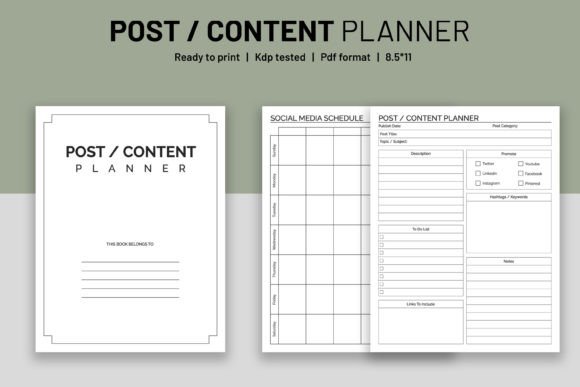
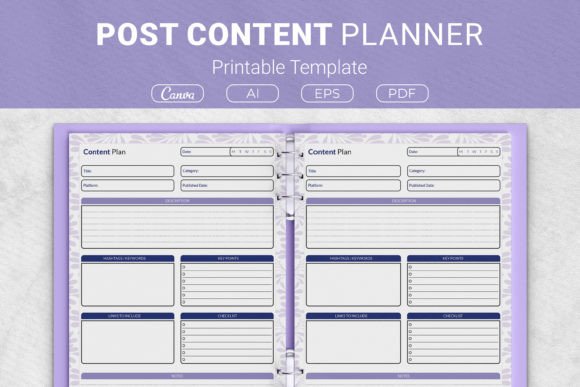
At its heart, the template breaks down post creation into manageable chunks. It includes a dedicated space for the description, where you flesh out the main idea and caption. This section encourages clarity right from the start, helping you tie the post back to a specific purpose—whether that’s promoting a product, sharing a tip, or driving engagement. Directly below, the key points area lets you list three to five supporting details that will anchor your message. By forcing concise bullet-style thinking, it reduces the temptation to ramble or stuff too many ideas into a single update.
The real organizational gain comes from the hashtags and keywords block. Instead of scrambling to remember which terms performed well in the past, you can assign a curated set to each post during the planning stage. This doesn’t just save time on publishing day; it also improves consistency across platforms. Many users keep a master list of industry-specific hashtags and rotate them intelligently through this section, avoiding the common trap of repeating the same tags over and over. A generous notes area rounds out the layout, offering space for reminders about visual assets, link placements, or follow-up tasks.
The Package and File Formats: Adapting to Your Preferred Workflow
One aspect of the Post Content Planner Template that often gets overlooked is the breadth of file formats included. You aren’t locked into a single app or editing tool. The package comes with AI Illustrator files that are open source, which means designers can tweak the template to match brand colors, fonts, or specific layout preferences without starting from scratch. An EPS file is also included for compatibility with vector-based workflows, while PDF files arrive print-ready, so you can output a crisp copy immediately on any standard printer.
For those who prefer a cloud-based design environment, Canva templates are accessible through provided links. This is particularly helpful for collaborators or teams that work across devices. In Canva, you can duplicate pages, adjust text boxes, and even add subtle branding elements while preserving the underlying planner structure. The combination of editable source files and ready-to-use formats means the template can serve as a permanent seed for a customized content planner rather than a static one-time download.
Sizing Options and Everyday Versatility
The Post Content Planner Template is available in four distinct sizes, each serving a slightly different need. US Letter (8.5 x 11 inches) and A4 (210 x 297 mm) are obvious choices for at-home printing and standard binder storage. If you like the idea of keeping a physical planning binder on your desk, these sizes punch holes easily and fit most three-ring and two-ring mechanisms. They also work well when you want to print a batch for a content brainstorming session.
The two compact dimensions—7.5 x 9.25 inches and 6 x 9 inches—open up additional possibilities. These smaller formats are ideal for turning the planner into a paperback workbook or a KDP (Kindle Direct Publishing) interior. Authors and publishers who create low-content books for Amazon often look for clean, uncluttered interiors that customers can write in comfortably, and this template provides exactly that. The 6x9 size, in particular, aligns with one of the most popular trim sizes for guided journals and planners, making it an efficient asset for anyone running a self-publishing project.
Beyond KDP, the smaller sizes also suit on-the-go use. Tuck a printed 6x9 sheet into a notebook cover or a traveler’s journal, and you have an instant content planning companion that doesn’t demand a full desk setup. The flexibility across dimensions means one template purchase can serve multiple roles—home office, digital planning, client binders, and even a publishable product.
Strengths That Emerge in Daily Use
After working with the Post Content Planner Template across different content teams and solo projects, a few lasting strengths become clear.
- Reduced decision fatigue. The sheet's linear sequence—describe, highlight, tag, note—mirrors a natural planning rhythm. You spend less cognitive energy deciding what to do next.
- Built-in repurposing potential. Since you capture the description, key points, and hashtags in one place, you can easily transform a single plan into multiple pieces of content for different platforms. A caption becomes a tweet thread; key points become video bullet points.
- Client-friendly sharing and feedback. The print-ready PDF or Canva version lets you share a complete post preview with stakeholders before publishing. The notes area keeps revision requests neatly tied to each post, reducing email back-and-forth.
Another quiet strength is how the template nudges consistency. Filling out the same sections repeatedly builds a content habit, making it harder to skip the planning stage. Over time, this simple discipline can lift overall post quality because every piece starts with intention rather than impulse.
Who Benefits Most from the Post Content Planner Template
This template isn’t a one-size-fits-all solution, but it aligns particularly well with several types of users. Small business owners who handle their own marketing will find it keeps them consistent without needing a steep learning curve. Rather than juggling multiple apps, they can keep a binder of completed planners and refer back to what worked. Freelance social media managers can use the sheet to onboard new clients; by filling out a planner together, they establish tone, preferred hashtags, and key messages from day one. The resulting documentation becomes a reference point for ongoing work.
Content creators and bloggers who publish across YouTube, Instagram, and a newsletter can treat each planner sheet as a pre-publishing checklist. The key points section easily translates into video chapter markers or email headers. KDP publishers and low-content book creators benefit from the immediate commercial application: the planner interior can be formatted into a sellable workbook without extra design fees. Finally, educators and coaches teaching social media basics can print the template as a handout, guiding students through a real-world planning exercise that mirrors professional workflows.
Practical Limitations and When the Template Might Not Be Enough
While the Post Content Planner Template covers core planning needs effectively, it’s worth noting a few boundaries.
- No integrated scheduling or analytics. You still need separate tools to publish posts and measure reach, engagement, or click-through rates.
- For large teams running dozens of daily posts across channels, the single-page format may feel too lightweight. Approval workflows, shared asset libraries, and collaborative calendars demand a more robust system.
- The template works best when you already have a content strategy in place. It organizes individual posts elegantly, but it won’t help you define your overarching pillars or audience research if those pieces are missing.
- Customizing the layout in Canva calls for basic familiarity with the platform. While the learning curve is gentle, complete beginners might need a few minutes to adjust fonts or colors.
These limitations are less about flaws and more about scope. The planner excels at what it was designed to do—structure single posts—and it doesn’t try to be something it’s not. For many independent creators, that focus is exactly what makes it usable day after day.
Embedding the Planner into a Long-Term Content Routine
To get the most out of the Post Content Planner Template, think of it as a living document rather than a one-off exercise. One practical approach is to batch-fill several sheets during a monthly content session, then store them digitally or in a binder organized by week. When a new campaign rolls around, pull out related planners and quickly scan the hashtags and key points that previously generated engagement. Over time, this builds an informal library of content ideas that can be refreshed and republished.
For KDP publishers, the template can evolve into a branded series. You might design a 90-day content planner book using the base layout, add inspirational quotes or coloring pages between sections, and list it on Amazon as a low-content book. Because the Canva and Illustrator files are fully editable, you can extend the template’s life across multiple products without paying for additional design work.
In a world where content demands are relentless, having a simple, well-laid-out planning sheet isn’t about fancy features—it’s about showing up prepared. The Post Content Planner Template doesn’t need to be jaw-dropping innovative to be useful; it just needs to reliably convert rough ideas into publishable posts. For the solo creator, the small business owner, or the freelancer juggling multiple accounts, that reliability is often worth more than a dashboard full of tools they’ll never fully adopt.