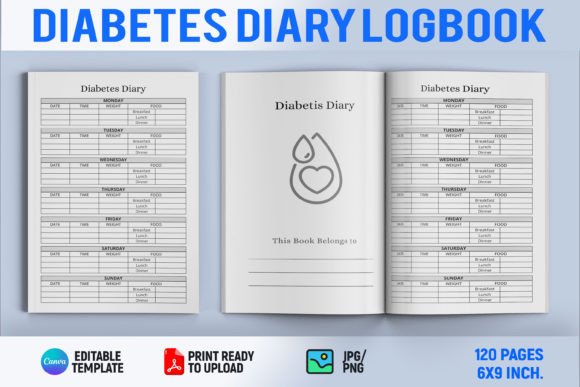
Diabetes Diary Log Book: From Blank Page to Best Seller
There is something deeply empowering about handing someone a tool that brings order to a chaotic part of life. A Diabetes Diary Log Book does exactly that. It’s not just a collection of dated pages—it’s a daily companion for anyone tracking blood sugar, meals, medication, and mood. For self-publishers on Kindle Direct Publishing, this kind of interior carries a special weight. It sits at the intersection of genuine need and recurring use, the sweet spot where thoughtful design meets real-world impact.
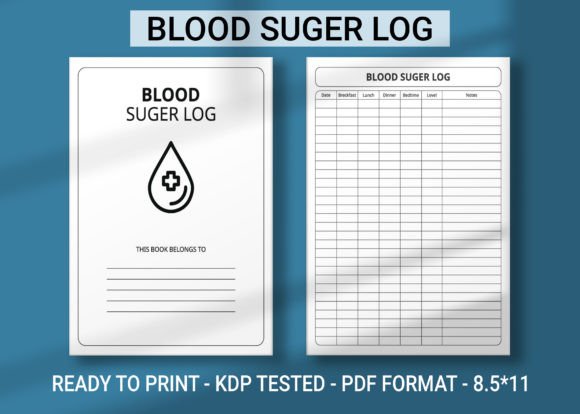
The ready-made Diabetes Diary Log Book Canva Editable KDP Interior Template removes the heavy lifting from that equation. Instead of staring at a blank screen, you step into a fully structured, professionally laid-out journal interior that you can shape to your own vision. Every line, every column, every heading exists to serve a clear function—recording glucose readings, noting insulin doses, tracking carbohydrate intake—but the magic is in how easily you can adjust those elements to speak with your voice.
Why a Diabetes Diary Log Book Matters
Health tracking journals are not impulse purchases. They are pragmatic, often recommended by physicians and diabetes educators. Someone juggling type 1, type 2, or gestational diabetes lives by data. A single missed reading can ripple through a week. A well-built logbook becomes a silent partner, catching patterns that the human memory glosses over. When you publish a Diabetes Diary Log Book, you are not just selling paper; you are offering a sense of control.
For the creator, this means every design decision carries responsibility. The template must be clear enough for a tired user at 6 a.m., tactile enough for a senior with slightly unsteady handwriting, and structured enough for a caregiver reviewing a month of entries. The Canva editable format hands you a skeleton that already respects these needs—wide date boxes, logically grouped sections, consistent alignment—so you can build trust visually before a single word is written.
Beyond the Basic Log: Creative Layout Possibilities
A diary is intimate, but a logbook can feel clinical. The most successful KDP interiors bridge that gap with warmth. With the template as your foundation, consider weaving in small creative touches that elevate the experience without cluttering the page.
- Mood and energy trackers — a simple row of facial icons or a 1–5 scale lets users correlate emotional states with glucose swings.
- Weekly reflection prompts — one or two lines like “What worked well this week?” turn a ledger into a self-care ritual.
- Color-coded sections — subtle background tints for breakfast, lunch, dinner, and bedtime readings improve scanability.
- Gratitude or affirmation spaces — small but mighty, these remind users that management is not about perfection.
Because the template lives inside Canva, experimenting with these additions is risk-free. Swap a narrow column for a wider box, test a new icon set, or layer in lightly dotted lines for freestyle jotting. The core structure holds its integrity, so you stay print-ready at every iteration.
Adapting the Template for Different Audiences
Not everyone opening your Diabetes Diary Log Book will have the same daily reality. That’s where your creative direction transforms a generic interior into something niche-specific.
For the Active Adult Managing Type 1
These users often juggle insulin pumps, continuous glucose monitors, and carb counting on the go. They need a tighter layout that honors speed. Trim some flourish, enlarge the carb and correction dose fields, and add a discreet pocket for noting exercise. A minimalist aesthetic with sans-serif fonts and crisp grid lines makes data entry feel less like homework.
For Seniors and Caregivers
Prioritize legibility above all else. Boost font sizes for headers, use high-contrast dark gray on cream rather than black on white to reduce glare, and introduce a daily checklist for medications. A caregiver version could include a separate column for notes to the healthcare team, creating a paper trail that bridges appointments.
For the Newly Diagnosed
A diary full of unfamiliar abbreviations intimidates. Here, you can infuse educational microcontent right into the template: short definitions under the “HbA1c” field, guidance on target ranges at the top of the week, or gentle icons that demystify terms. The Canva editor lets you add small text overlays without crowding the main log areas.
For Gestational Diabetes
Time-bound and emotionally layered, gestational diabetes demands a softer approach. A pastel palette, trimester-specific tracking, and a dedicated space for meal planning with protein/fat/carb breakdowns can make the experience feel less medical and more nurturing. The template accommodates these shifts through simple palette changes and reordered sections.
Design Choices That Build Trust and Clarity
When a reader opens your book, the first impression is not the cover—it’s the first interior spread. That spread must telegraph reliability. The Diabetes Diary Log Book Canva Editable KDP Interior Template arrives with a considered baseline: balanced margins, evenly spaced rows, and type hierarchy that leads the eye naturally. Your job is to refine, not rebuild.
Typography matters deeply here. A single consistent font family with clear numerals prevents misread glucose values. Stick to open, rounded figures where 6 and 8, 3 and 5, are unmistakable. Similarly, avoid pure black text; a charcoal or deep navy feels friendlier on paper while maintaining scan clarity.
White space is functional, not wasteful. Generous padding around each entry field reduces stress. It invites deliberate writing rather than cramped scribbles. This also benefits the print experience—KDP’s matte and cream paper looks more intentional when layouts breathe.
Visual anchors like subtle shading on alternating rows or thin divider lines between days guide the eye without shouting. These details live in Canva as simple element adjustments, and once set, they repeat beautifully through the entire interior.
From Template to a Profitable KDP Business
Speed is the silent advantage here. Traditional interior design for a 120-page log book can eat up weeks of formatting, testing, and late-night alignment fixes. With this template, you skip straight to personalization. A morning spent adjusting the cover, tweaking the header, and adding a few custom pages, and you’re ready to export a print-ready PDF.
The efficiency doesn’t stop at one title. Once you understand the template’s bones, you can spin off variations effortlessly. A companion Insulin Dosage Log Book, a Diabetes & Blood Pressure Tracker, or a Child-Friendly Diabetes Diary all stem from the same core file. Each becomes a separate KDP listing, multiplying your catalog without multiplying your workload.
For those building a brand around health and wellness journals, consistency becomes a competitive edge. A recognizable style—say, a soft botanical header, a particular shade of sage green, and a trusted layout—signals quality across your entire series. The template ensures that your interiors never drift into misalignment, no matter how many titles you release.
Staying Ahead: Adding Value to Your Log Book
The diary log niche is alive with demand, but it also rewards publishers who go a step further. Consider bundling free printable inserts via a link in the book, such as a pharmacy visit log or a quarterly goal-setting sheet. While the physical product stays clean and focused, that digital extra positions you as a thoughtful creator, not just a template filler.
Another path is localization. A Diabetes Diary Log Book with meal sections tailored to regional cuisines—Mediterranean, South Asian, Latin American—immediately stands out in a crowded marketplace. You can quickly replace food icon sets and example items within Canva, giving the same interior a culturally relevant makeover.
You might also consider a companion edition for healthcare professionals. A condensed logbook designed for clinic use, where a nurse or dietitian reviews weeks of data in minutes, requires a different kind of summary page. The editable template allows you to prototype that fast—pull key metrics into a front-facing dashboard spread and streamline the daily entries.
Practical Tips to Keep Your Results Audience-Friendly
Creativity flourishes within boundaries. As you customize, ground every choice in how a real person will hold and use the final book. Ask yourself: At 3 a.m., in dim light, can I find today’s date? Can I distinguish post-meal values from fasting values in a glance? Does the binding allow the book to lie flat? While you can’t control KDP’s binding, generous inner margins and avoidance of content near the spine make a real difference.
Test-print a few pages at home if possible. A layout that gleams on a 27-inch monitor sometimes feels tight on 6×9-inch paper. Check line weights—overly thin lines might vanish on cream stock. Use Canva’s export settings to generate high-resolution PDFs with bleed, so your final KDP upload passes preflight checks without a hitch.
Lastly, name your creation with intention. A title like “52-Week Glucose & Lifestyle Companion” carries more emotional resonance than “Blood Sugar Log.” It hints at transformation, not just tracking. The right title, paired with a clean interior, becomes your book’s promise.
The Diabetes Diary Log Book Canva Editable KDP Interior Template is far more than a shortcut. It’s a launchpad for thoughtful, income-generating journals that meet real needs. Every color, every column, every customized detail is a chance to connect with someone who simply wants to feel well. When you blend a robust template with your own creative instincts, the result isn’t just a book—it’s a tool that quietly changes lives, one logged day at a time.