Cloud Burst Notepad Templates for Every Creator
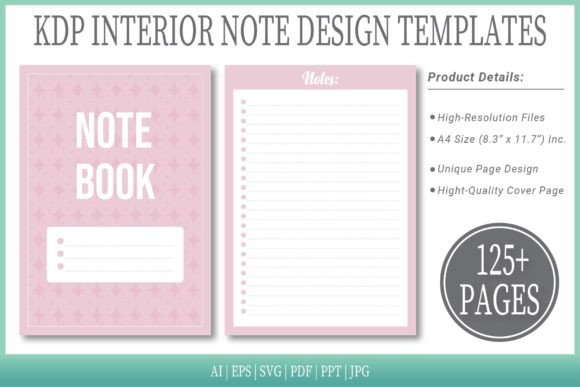
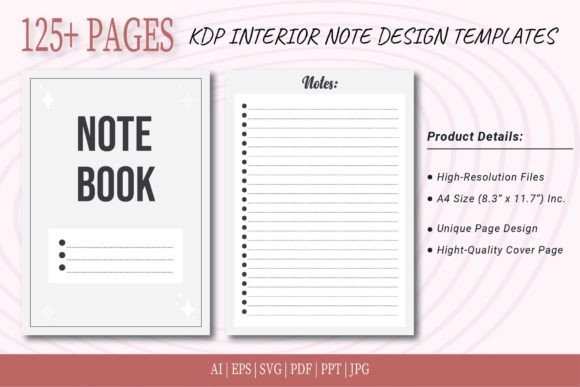
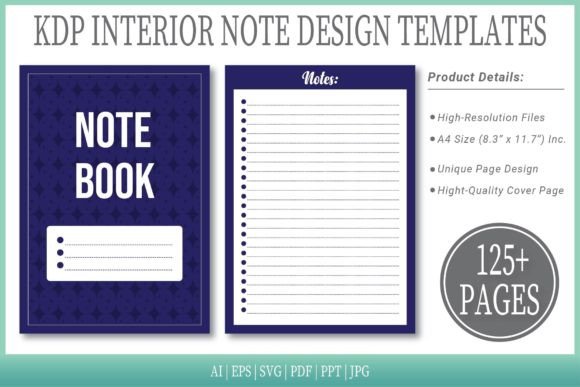
When you download Cloud Burst Notepad Templates, you get far more than a simple PDF file. This bundle includes 100 ready‑to‑upload interiors, high‑resolution source files in six editable formats, and even an extra cover page. Each template is sized at A4 (8.3″ × 11.7″), with no bleed, and spans 125 pages. Whether you plan to publish on Amazon KDP, print pages for a workshop, or customize the artwork for a client project, the setup is built to remove friction and let you focus on what matters most.
Many people assume that notepad templates are only useful for designers. The reality is that these resource kits sit at the intersection of convenience and creative control. They can solve different challenges for beginners who need a quick start, experienced professionals who value editable source files, and everyone in between. The key is understanding how a single template collection can serve very different goals—often at the same time.
Who Can Benefit from These Notepad Templates?
Not every user approaches a product with the same priorities. A freelance illustrator might care about layer‑friendly vector files. A coach running a productivity workshop might simply need a printable handout that looks polished. Recognizing these differences helps you decide whether Cloud Burst Notepad Templates fit your workflow—and if they do, how to get the most out of them.
For the Absolute Beginner: No Design Skills Needed
If you have never uploaded anything to KDP or customized an interior file, the phrase “vector AI file” can sound intimidating. The good news is that these templates ship with a ready‑to‑use PDF. You can open the document, review the pages, and upload directly to Amazon—no technical tweaks required. The preset A4 size and no‑bleed layout mean you won’t have to worry about trimming or margin issues. For a first‑time publisher, this removes the guesswork and lets you focus on the content you want to add, whether that’s a simple gratitude journal, a daily planner, or meeting notes.
Beginners also benefit from the inclusion of JPG and PPT formats. Drop a JPG into Canva or a slide deck, add your own text boxes, and you have a personalized notepad design in minutes. You don’t need to learn Illustrator. You don’t need to understand layers. The template meets you where your skills are right now.
For the Experienced Designer: Full Creative Control
Advanced users typically look under the hood. With Cloud Burst Notepad Templates, that means accessing the editable source files: AI (Adobe Illustrator), EPS, and SVG. All of these keep the artwork in crisp, scalable vector format. You can change colors, swap out patterns, adjust line‑art elements, or even repurpose the base composition for a completely different product. Because the files are fully layered, you retain the flexibility to brand the notepad for a client, create multiple color variants, or adapt the layout from warm‑toned to minimal grayscale with a few clicks.
Experienced designers also appreciate the time saved. Instead of building a 125‑page internal structure from scratch, you open a file that already has a cohesive rhythm across all pages. You can then redirect your energy toward high‑value customization rather than repetitive setup work. The SVG format, in particular, plays well with modern design tools like Affinity Designer and Figma, offering a smooth cross‑app experience.
For Small Business Owners and Marketers
If you run a stationery shop, an Etsy store, or a coaching practice, notepads can become a surprisingly effective asset. They work as low‑cost lead magnets, bonus content for online courses, or simple add‑on products. The challenge for many small business owners is that producing these items usually means hiring a designer or struggling with unfamiliar software. These templates dramatically lower that barrier.
You can take the PPT or PDF file, insert your own header, footer, or logo, and quickly generate a branded notepad for a client workshop. Because the interiors are already high‑resolution and professionally composed, the final result feels cohesive and trustworthy. The included cover page gives you a head start on a polished product listing image or a printable cover sheet. The JPG format even lets you create quick social media previews without any extra conversion steps.
For those who plan to sell the notepad as a KDP low‑content book, the 100 ready‑to‑upload interiors eliminate the need to format page numbers, gutters, or margins. The entire pack is already optimized for Amazon’s requirements, which can significantly speed up your publishing pipeline while keeping production costs near zero.
For Educators and Workshop Facilitators
Teachers, trainers, and coaches often need reusable handouts that look inviting but don’t distract from the learning material. A clean notepad layout can hold brainstorming notes, reflection prompts, or sketched diagrams. Because the templates are sized A4 with no bleed, they print cleanly on standard paper in most parts of the world. You can photocopy pages or print them in bulk without worrying about edges being clipped.
For group workshops, the PDF file lets you print only the pages you need—perhaps a sequence of 10 templates repeated for multiple participants—while leaving the master file untouched. The ability to open the file in AI or EPS also means you can localize the content, replacing any placeholder text with instructions in your preferred language before printing.
For Hobbyists and Creative Journaling Enthusiasts
Maybe you have no plans to sell or distribute anything. You simply enjoy beautiful stationery and want a consistent journaling companion. Printing these templates at home gives you a continuous supply of fresh notepad pages without the recurring cost of purchasing branded journals. You can also mix and match pages from the 125‑page set, creating a custom‑bound notebook that suits your handwriting style, planning system, or morning routine. The high‑resolution artwork ensures that even dense pen work or fountain pen ink won’t bleed through and obscure the delicate background illustrations.
Why the Format Selection Matters
Many template bundles ship with only a PDF. While a PDF is convenient, it can also limit your long‑term options. Cloud Burst Notepad Templates include six different formats for a reason: each serves a distinct purpose across different stages of your project.
- AI & EPS: Full vector control for professionals who use Adobe Illustrator. Ideal for deep customization and brand alignment.
- SVG: A universal vector format that works across open‑source and modern design tools. Great for quick edits without an Adobe subscription.
- PDF: Plug‑and‑play for direct upload to KDP or instant printing. The no‑bleed A4 size makes it press‑ready.
- PPT: Perfect for adding text boxes, charts, or team logos if you feel most comfortable in presentation software.
- JPG: Simple image files that open anywhere. Handy for previews, social graphics, or dropping into online design platforms.
This format flexibility extends the lifespan of your purchase. What starts as a simple KDP notebook can later become a branded notebook for a client, a printed handout for a conference, or even a digital download on your own website—all using the same set of base files.
How to Choose the Right Starting Point
If you feel unsure which format to use first, ask yourself two questions: “Do I need to edit the design itself?” and “What software am I most comfortable with?”
No design changes needed: Open the PDF and either upload it to KDP or hit print. The layout is ready, and you can start using the notepad within minutes.
I want to add my own branding or text: Use PPT or JPG. You can place text boxes or overlay your logo without touching the original vector artwork.
I need to alter colors, remove elements, or create a fresh version: Reach for AI, EPS, or SVG. Make a copy of the original file first so you always have a clean fallback, then customize freely.
This layered approach means you never have to fight with a format that doesn’t match your toolset. It also protects beginners from the paralysis of too many complex options while keeping the door open for growth.
Practical Examples Across Different Uses
To see how these templates fit into real projects, consider a few scenarios:
- KDP publisher: You want to launch a line of floral‑themed notepads. You take the PDF, upload it directly, and publish three variants by changing only the cover. The interior remains identical, saving you hours of formatting.
- Graphic designer: A client asks for a minimalist notepad to include in a coaching welcome kit. You open the AI file, switch the color palette to match the client’s brand, insert the coaching logo on each page footer, and export a new PDF. All 125 pages update consistently because the template is built with a master spread structure.
- Yoga instructor: You host a retreat and need 50 printed notepads. Using the PDF, you print the pages double‑sided, punch holes, and bind them with a simple ribbon. Each participant receives a keepsake that feels intentional, not generic.
- Content creator: You want to film a planner setup video. You use the JPG files to create a digital mockup, record your screen while filling in the pages, and share the template link with your audience as a freebie.
None of these scenarios require the same skill level, yet all draw from the same resource. That’s the main advantage of a collection that ships with editable source files and production‑ready exports side by side.
What to Look for in a Long‑Lasting Template
Not all templates are built to evolve with you. When you evaluate Cloud Burst Notepad Templates—or any similar resource—pay attention to the underlying structure. Ask whether the interior pages rely on a single, uneditable background or whether they preserve layered artwork. Look for a generous page count that reduces the need to manually duplicate sheets. Check that the resolution stays crisp at real print size (300 DPI is a good baseline, and these interiors meet that standard). Also confirm that the size matches your intended output without requiring risky scaling.
The “no bleed” specification is especially valuable for print‑at‑home users. Bleed setups require extra paper trimming, which adds complexity. With a no‑bleed A4 layout, what you see in the file is what you get on the paper—no hidden surprises.
Because the download includes both vector originals and presentation‑ready formats, you aren’t locked into a single ecosystem. If you switch from Illustrator to Affinity, the SVG bridges that gap. If you onboard a new team member who only works in Canva, the JPG makes collaboration possible without licensing issues.
Integrating the Templates Into Your Creative Routine
One of the quietest benefits of a well‑structured template set is how it removes friction from recurring creative tasks. Instead of staring at a blank page each time you need a new notepad, you start from a finished composition. That momentum can be game‑changing when you’re publishing regularly or when you need a fast turnaround on a client request.
You might begin by using the PDF as is. A few months later, you might explore the AI file to create a subtle gradient that matches your updated brand colors. Later still, you could extract individual page elements to repurpose them within a digital planner. The 125‑page window gives you enough variety to test different layouts while maintaining a unified look across all versions.
For those who worry about file clutter, the bundle includes an organized structure. Keeping the original archive safe means you can always revert any experimental edit. This eliminates the fear of “breaking” a design, which empowers you to practice new techniques on a professional‑grade base without losing your safety net.
The additional cover page template helps complete the package, whether you’re publishing on Amazon, sharing a digital product, or binding a personal notebook. It creates a first impression that signals care and attention, even if the interior remains relatively simple. When paired with a thoughtful interior, the overall result feels far greater than the sum of its parts.
Ultimately, Cloud Burst Notepad Templates are about giving you options. Options to start simple. Options to dig deeper. Options to repurpose one purchase across multiple projects without ever feeling like you’re fighting the format. That adaptability is what makes a template feel less like a static design file and more like a quiet partner in your creative work.